Solar Battery Backup: What Can You Run During a Blackout?
Why solar panels often stop in a blackout, what a battery can keep running, and how long it lasts.
Plenty of people are surprised the first time the power goes out: the roof is covered in solar panels, the sun is shining, and the house is still dark. Whether your system keeps anything running depends on how it's set up, not just on having panels or a battery.
This guide explains the difference between the main types of system, how to choose the loads that matter, and how to estimate how long a battery will last.
1. Grid-connected or off-grid? It makes all the difference
Grid-connected solar with no battery. In a blackout, a standard grid-connected inverter switches off. This is a safety requirement: it stops the system sending power into the street wiring while line workers are fixing it. So with no battery, solar panels alone usually give you nothing during a blackout, even in full sun.
Grid-connected solar with a battery. A battery doesn't automatically mean backup. The system only keeps running in a blackout if:
- the inverter has a backup function (often called backup, EPS or emergency power), and
- the backup output has been wired to some or all of your circuits by a licensed electrician.
Many systems only back up selected circuits, such as the fridge, lights and a few power points. Some switch over instantly. Others take a moment, so clocks and computers may reset. Check your system's specification or ask your installer exactly what your system does.
Off-grid systems. An off-grid system isn't connected to the grid, so a blackout in the street doesn't affect it at all. It runs as normal, within the limits of its battery, panels and inverter.
Portable power stations. A portable power station runs whatever you plug into it directly, regardless of the grid. Wired For The Wild covers these in Portable Power Stations and Power Station vs DIY Battery Box.
2. Two limits: power and energy
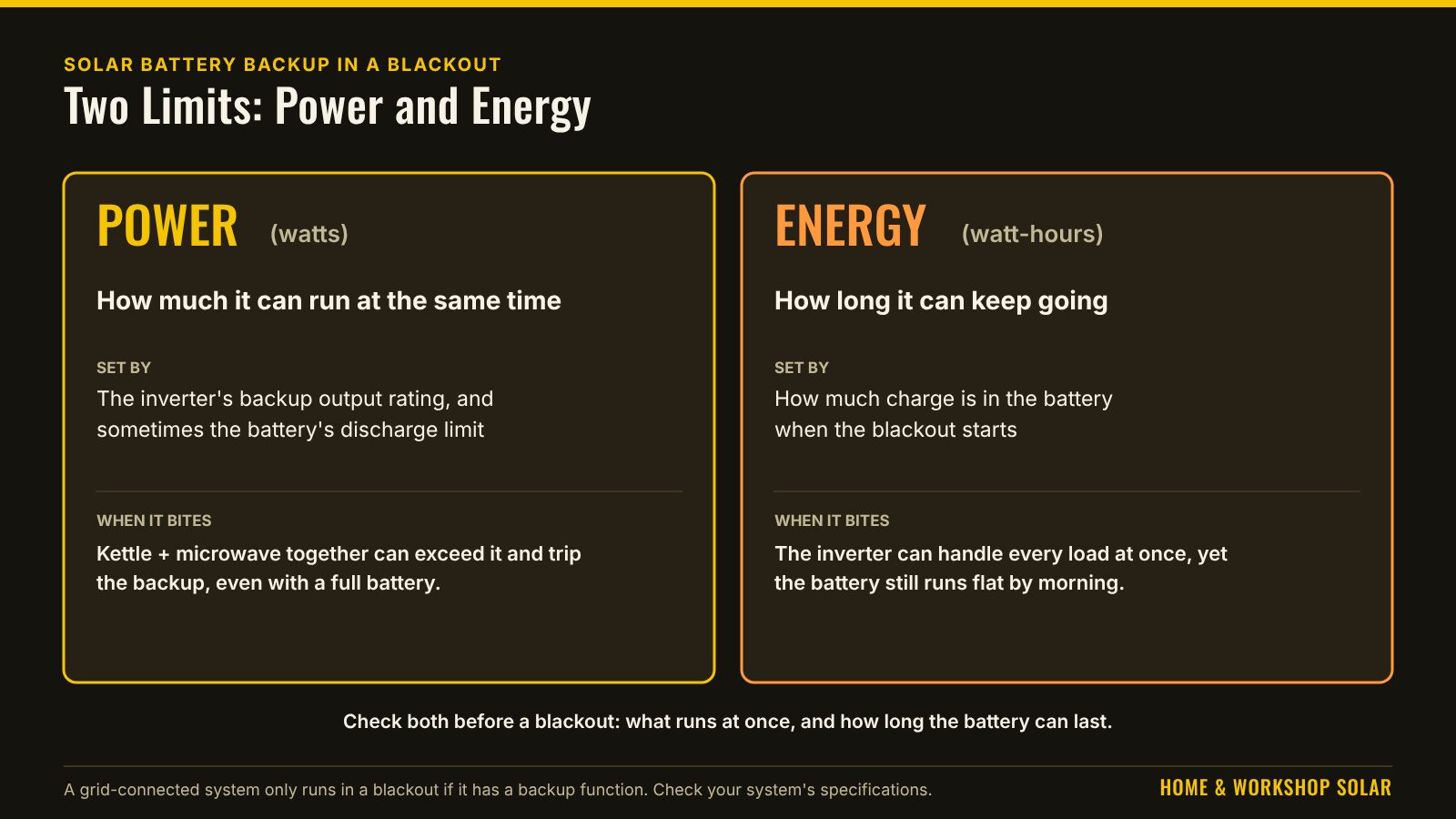
A backup system has two separate limits:
- Power (watts): how much it can run at the same time. This is set by the inverter's backup output rating, and sometimes by the battery's discharge limit.
- Energy (watt-hours): how long it can keep going. This is set by how much charge is in the battery when the blackout starts.
A battery can have plenty of energy but still trip when you put the kettle on with the microwave going, because together they exceed the backup power rating. Or the inverter can handle everything at once, but the battery runs flat by morning.
3. Choose your critical loads
Most blackout plans start with a short list of what really matters:
- Fridge and freezer: usually first on the list.
- Some lights.
- Internet modem and router, and phone charging, so you can get news and stay in touch.
- A fan or a small heater, depending on the season, if the system can handle it.
- Water pump, if you're on tank water.
- Medical equipment. If anyone in the home relies on powered medical equipment, talk to the equipment provider and your electricity retailer about a plan. Don't rely on a home battery alone.
Big loads drain a battery quickly or exceed what it can deliver. These usually stay off during a blackout: ducted or large split-system air conditioning, electric ovens and cooktops, electric hot water, pool pumps, clothes dryers and EV charging.
4. Worked example: how long will the battery last?
Every figure is an example assumption, not a measurement or a product recommendation. Use your own appliance labels, energy ratings and battery specification.
A blackout starts at 7pm. The battery has 5,000Wh of usable energy left at that moment (it isn't full, because it has been running the house since sunset).
| Critical load | Working | Wh per day |
|---|---|---|
| Fridge (rated 300kWh a year) | 300,000 ÷ 365 | about 820 |
| Chest freezer (example 0.6kWh a day) | — | 600 |
| LED lights, 60W in total for 5 hours | 60 × 5 | 300 |
| Modem and router, 15W around the clock | 15 × 24 | 360 |
| Phone and laptop charging | example | 100 |
| TV, 100W for 3 hours | 100 × 3 | 300 |
| Pedestal fan, 50W for 8 hours | 50 × 8 | 400 |
| Total | 2,880 |
Add about 15% for inverter losses and the system's own use: 2,880 × 1.15 ≈ 3,310Wh a day.
Runtime: 5,000 ÷ 3,310 ≈ 1.5 days, about 36 hours, if the panels can't recharge the battery during the blackout.
Now add one big load. A 1,500W split-system air conditioner running for 6 hours uses 1,500 × 6 = 9,000Wh. That's nearly twice the battery's remaining energy on its own. Heavy loads change the answer completely.
Check the power too. If the backup output were rated at 3,000W (example), a 2,400W kettle plus a 1,100W microwave at the same time would be 3,500W, over the limit, before the fridge even starts. Run big appliances one at a time.
The Daily Power Needs Calculator adds up the energy for your own list, and the Inverter Size Calculator checks what can run at once, including motor start-up surge. The Blackout Runtime Calculator works out the runtime for your own list.
5. Can the panels recharge it during a blackout?
It depends on the system. Some hybrid systems keep charging the battery from the panels while running in backup mode, so a sunny day can carry you through a long outage. Others can't charge from the panels until the grid comes back. Ask your installer or check the specification before you rely on it.
6. Making a battery last longer
- Turn off what you don't need, especially big heating and cooling loads.
- Keep fridge and freezer doors shut. A full freezer holds its cold for longer.
- Use heavy appliances one at a time, and in the middle of the day if the panels are charging.
- Set a backup reserve if your system allows it, so the battery never runs right down in normal use and always keeps some charge for a blackout.
6a. Two more scenarios
Scenario B: a winter evening with a heater. This is the same 7pm blackout with the same 5,000Wh left, but a 1,000W heater (example) runs for 4 hours. That adds 4,000Wh, so the daily total is (2,880 + 4,000) × 1.15 ≈ 7,910Wh. The battery now lasts 5,000 ÷ 7,910 × 24 ≈ 15 hours instead of about 36. One heating appliance cut the runtime by more than half.
Scenario C: a sunny day with recharging. If your system can charge the battery from the panels in backup mode (see section 5), and the panels make more on a sunny day than the critical loads use, the battery is topped up each day. Those critical loads can then keep running for as long as the weather holds, while the big loads stay off. A run of cloudy days brings you back to the battery-only figure.
6b. The backup reserve trade-off
Many grid-connected batteries let you set a backup reserve: a share of the battery kept back for blackouts and not used for everyday bill savings.
Example (made-up figures): a battery with 10,000Wh usable and a 30% reserve always holds 3,000Wh back. If a blackout starts when the battery is down to that reserve, the critical loads from section 4 (about 3,310Wh a day) run for about 3,000 ÷ 3,310 × 24 ≈ 22 hours.
- A higher reserve gives more blackout cover but less everyday saving, because that energy isn't used to avoid grid power.
- A lower reserve saves more on bills but leaves less for a blackout.
Some people raise the reserve when storms are forecast. Check how your system sets it, and whether it can do this automatically.
7. Portable power stations and generators
A portable power station is a simple backup for a fridge, lights and phones. Plug the appliances straight into it. The Wired For The Wild Power Station Runtime Calculator estimates how long one will last.
Example (illustrative only): a station with 900Wh usable, running the fridge, modem and lights above (820 + 360 + 300 = 1,480Wh a day at the plug), with 85% inverter efficiency: 1,480 ÷ 0.85 ≈ 1,740Wh a day from the battery. 900 ÷ 1,740 × 24 ≈ 12 hours.
Generators: run them outdoors only, well away from doors, windows and vents. Exhaust fumes can kill.
Never connect a power station or a generator to your home's wiring by plugging it into a power point or a home-made lead. It can feed power back into the street and kill line workers, or damage your wiring. A connection to the home's wiring needs an approved inlet and changeover switch installed by a licensed electrician.
8. Before the next blackout
- Find out exactly what your system does in a blackout, and which circuits are backed up. Ask your installer if you're not sure.
- Label the backed-up power points.
- Write your critical-load list and its daily energy.
- Check the backup power rating and the battery's usable energy in the specification.
- Test it, if your installer can show you how to safely.
9. My blackout plan (fill in)
| Critical load | Watts | Hours a day | Wh a day |
|---|---|---|---|
| Total | |||
| × 1.15 for losses |
- Backed-up circuits or power points: ______________________
- Backup output power rating (W): ________ Usable battery energy (Wh): ________
- Backup reserve setting (%): ________ Charges from panels in backup mode? Yes / No / Don't know
- Runtime estimate: usable energy at the start ÷ daily total × 24 = ________ hours
- Big appliances that stay off: ______________________
- Contacts: installer ________ · electricity distributor outage line ________ · medical equipment provider (if any) ________
10. My backup didn't work: common causes
| What happened | Likely cause | What to do |
|---|---|---|
| Everything went off, panels and all | No backup function, or backup not wired to any circuits | Ask your installer what your system does; adding backup needs a licensed electrician |
| Only some things stayed on | Only selected circuits are backed up | Label the backed-up power points so everyone knows |
| Backup came on, then shut off | Backup power rating exceeded, often by a kettle, heater or air conditioner | Run big loads one at a time, or not at all |
| Battery ran flat much sooner than expected | Heating or cooling loads; battery wasn't full; low reserve | Check the reserve setting; trim the critical-load list |
| Battery didn't recharge on a sunny day | System can't charge from the panels in backup mode | Check the specification with your installer |
| Clocks and computers reset at the switch-over | The switch-over isn't instant | A small uninterruptible power supply (UPS) for the modem or computer, if it matters |
Anything involving the inverter, switchboard or wiring is a job for your installer or a licensed electrician.
11. Frequently asked questions
Will my rooftop solar work in a blackout?
Without a battery and a backup-capable inverter, usually not. Standard grid-connected inverters switch off for the safety of line workers.
Can I add blackout backup to my existing system?
Sometimes. It depends on the inverter. It may need a backup-capable hybrid inverter or a separate battery inverter, and wiring by a licensed electrician. Ask your installer.
How big a battery do I need for blackouts?
Add up your critical loads for a day (section 4), add about 15%, and multiply by the days you want to cover. Then check the backup power rating covers what runs at once. See How to Size a Battery Bank.
Can a home battery run my air conditioner?
Possibly, if the backup output rating allows it, but it uses energy very quickly. In the example, six hours of a 1,500W air conditioner needs nearly twice the battery's remaining energy.
Is a portable power station enough?
For a fridge, the modem, lights and phones over an evening, often yes. For a long outage, it needs recharging from panels, a car or a generator.
Can I plug a generator into a power point to run the house?
No. It can feed power back into the street and kill line workers, or damage your wiring. You need an approved inlet and changeover switch installed by a licensed electrician.
These are planning estimates only, not a system design, wiring specification or safety assessment. Real results depend on your appliances, the weather and the gear you have.
Safety: in Australia, any work on 240V AC wiring, including connecting an inverter, battery, solar system or generator inlet to a home's switchboard or fixed wiring, must be done by a licensed electrician. Grid-connected systems also need approval from your electricity network.
Handy gear
These are examples to compare, not a recommendation for your home. Check any model's data sheet against this guide.
BLUETTI Elite 100 V2
1,024Wh LiFePO4 power station with 1,800W AC output and UPS-style switchover (maker's figures).
See it at BLUETTI AustraliaBLUETTI Elite 200 V2
2,073.6Wh LiFePO4 power station with 2,600W AC output, for longer outages (maker's figures).
See it at BLUETTI Australia
As an Amazon Associate I earn from qualifying purchases. I also earn commission from BLUETTI through the Awin network, at no extra cost to you. Prices and availability are shown on each seller's site.
Related guides
Pure Sine vs Modified Sine Inverters
How the two types of inverter differ, which appliances and tools need pure sine, and what to check before you buy.
Read guide →
How to Calculate Your Home or Workshop Power Needs
The first step for any solar system: list what you run, how long for, and turn it into the daily energy your system has to supply.
Read guide →